Pen Tablets for Schools
A pen tablet for schools is the teacher’s writing instrument at the lectern: a flat input surface beside the laptop or monitor, written on with a battery-free pen while the strokes appear on the connected screen. Huion’s education pen tablets — the H640P, the HS610, and the Q630M — all use battery-free electromagnetic resonance pens with 8192 levels of pressure sensitivity, so handwriting stays natural across long lectures and there is never a pen to charge. Every specification on this page is taken from the official B2B education product pages.
Why a Pen Tablet Belongs at the Lectern
The lowest-cost way to give every teacher digital handwriting.
A pen tablet is the simplest education input device to deploy at scale: it is a flat pad, thinner than a textbook, that connects over USB (and Bluetooth on the Q630M) and works with the teaching software the school already runs. The teacher writes on the tablet while looking at the monitor or projector — a coordination most users pick up within a lesson — and every stroke is captured with 8192 levels of pressure sensitivity, so board writing has the same thick-thin character as chalk or marker.
The battery-free EMR pen is the operational reason schools standardize on these models. A classroom set of pens that needs no charging eliminates the daily ritual of collecting, charging, and redistributing styli; it also removes batteries from the consumables budget entirely. The pen draws its energy from the tablet surface itself, which is why the H640P, HS610, and Q630M can all advertise battery-free operation as a headline feature rather than a footnote.
For teachers who want to write directly on the image, the step up is a pen display for classrooms; for students writing at their desks, see digital notepad tablets; and for the front of the room, the interactive display for education scales the pen experience to the whole class. The education overview shows the full lineup.
H640P — Compact Pen Tablet
An 8mm-thin tablet with the PW100 pen for tight lectern spaces.
The H640P is the compact choice: 260 x 147.7 x 8mm and 277g, with a bezel-less design the official page describes as adding a stylish touch. The battery-free PW100 pen delivers 8192 levels of pressure sensitivity — the company’s own chip and algorithm render lines in different shapes and saturation as pressure varies — at a 233PPS report rate for instant response to pen movements. Six programmable press keys put common functions under the fingertips, and the workspace is 160 x 100mm in PC mode plus a 62.5 x 100mm phone mode. Besides Windows and macOS, the H640P supports Android devices, so it can serve a teacher’s tablet or phone as well as the classroom PC. Sensing height is 10mm, accuracy ±0.3mm, and the interface is Micro USB.
| Item | Specification |
|---|---|
| Model | H640P |
| Digital Pen | PW100 (battery-free EMR) |
| Pressure Sensitivity | 8192 Levels |
| Report Rate | 233PPS |
| Press Keys | 6 Programmable Press Keys |
| Workspace | PC Mode: 160 x 100mm; Phone Mode: 62.5 x 100mm |
| Dimension | 260 x 147.7 x 8mm |
| Net Weight | 277g |
| Sensing Height | 10mm |
| Accuracy | ±0.3mm |
| Interface | Micro USB |
| OS Support | Windows 7 / macOS 10.12 / Android 6.0 or later |
| Color | Black |
HS610 — Pen Tablet with Touch Ring
A larger tablet with ±60° tilt support for expressive teaching.
The HS610 steps up to a 254 x 158.8mm PC-mode workspace (plus 99.3 x 158.8mm phone mode) in a 350 x 211.8 x 8mm, 600g body — still 8mm thin with the same bezel-less styling. The battery-free EMR pen works at 8192 pressure levels and a 266PPS report rate, and adds ±60° tilt support, which the official page notes enables drawing skills to be fully performed: shading with the side of the pen tip works the way it does on paper. Workflow controls are generous — 12 programmable press keys plus 16 programmable soft keys plus a touch ring — so teachers can map undo, eraser, zoom, and page-turn to hardware instead of hunting through menus mid-lecture. OS support covers Windows, macOS, and Android; sensing height is 10mm and accuracy ±0.3mm.
| Item | Specification |
|---|---|
| Model | HS610 |
| Pen Technology | Battery-free EMR |
| Pressure Sensitivity | 8192 Levels |
| Report Rate | 266PPS |
| Tilt Range | ±60° |
| Touch | Touch Ring |
| Press Keys | 12 Programmable Press Keys; 16 Programmable Soft Keys |
| Workspace | PC Mode: 254 x 158.8mm; Phone Mode: 99.3 x 158.8mm |
| Dimension | 350 x 211.8 x 8mm |
| Net Weight | 600g |
| Sensing Height | 10mm |
| Accuracy | ±0.3mm |
| Interface | Micro USB |
| OS Support | Windows 7 / macOS 10.12 / Android 6.0 or later |
| Color | Black |
Q630M — Bluetooth Pen Tablet with Dual Dials
Wireless freedom and dial controllers for teachers who move between rooms.
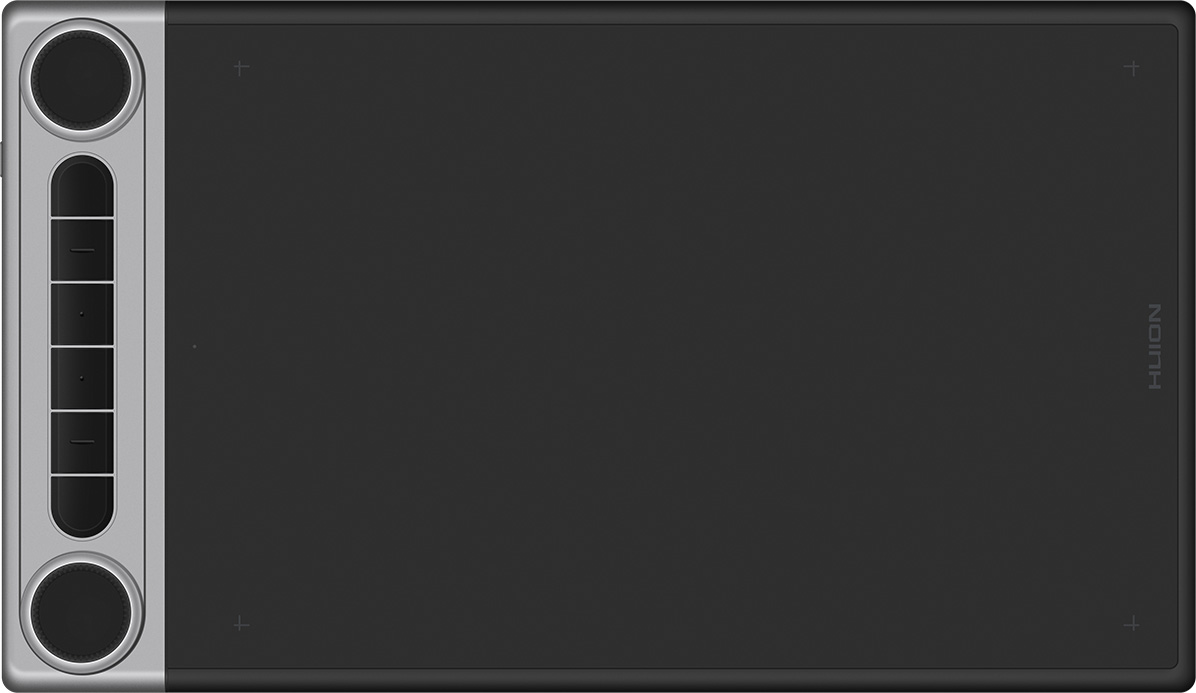
The Q630M is the education channel’s Bluetooth pen tablet: Bluetooth 5.0 wireless connection plus wired USB-C, with about 18 hours of battery life from a 1300mAh battery at only 0.3W power consumption — a full teaching day without a cable. The official education listing describes dual dial controllers and six programmable press keys (plus two function-switch buttons) to facilitate creation; the dials map naturally to zoom, scroll, and brush-size-style controls in teaching software. The digital pen is the PW517 adopting PenTech 3.0, which the official page credits with a shorter retraction distance and a more accurate, natural writing experience, on a specially treated panel with paper-like textures for pen-on-paper feel. Report rate is >300PPS with 8192 levels of pressure sensitivity, the workspace is 266.7 x 166.7mm in PC mode (10.5 x 6.56 inch) and 166.7 x 83.35mm in phone mode, and the symmetrical design suits left- and right-handed teachers alike. OS support is the broadest of the three tablets: Windows, macOS, Android, ChromeOS, and Linux. The unit measures 356.6 x 207 x 8mm and weighs 710g.
| Item | Specification |
|---|---|
| Model | Q630M |
| Digital Pen | PW517 (PenTech 3.0) |
| Pressure Sensitivity | 8192 Levels |
| Report Rate | >300PPS |
| Wireless Connection | Bluetooth 5.0 |
| Battery Life | About 18hrs |
| Battery Capacity | 1300mAh |
| Power Consumption | 0.3W |
| Press Keys | 6 Programmable Press Keys + 2 Dial Controllers + 2 Function-switch Buttons |
| Panel | Specially treated panel with paper-like textures |
| Workspace (PC Mode) | 266.7 x 166.7 mm (10.5 x 6.56 inch) |
| Workspace (Phone Mode) | 166.7 x 83.35mm (18:9) |
| Sensing Height | >10mm |
| Pen Resolution | 5080 LPI |
| Interface | USB-C |
| OS Support | Windows / macOS / Android / ChromeOS / Linux |
| Net Weight | 710g |
| Dimension | 356.6 x 207 x 8mm |
| Color | Black |
Choosing Between the Three Tablets
Match the tablet to the teaching setup.
All three share the essentials that make a pen tablet school-proof: battery-free pens, 8192 pressure levels, and no consumables. Compare with the pen displays for classrooms when teachers prefer writing directly on the image, and see the education overview for the complete deployment picture.
Pen Tablet FAQ
Do pen tablets work with a projector?
Yes. A pen tablet drives the connected computer exactly like a mouse with pressure — whatever the computer shows on the projector, the teacher can annotate. This makes pen tablets the simplest upgrade for projector-equipped classrooms.
How long does the Q630M battery last in real teaching?
The official specification lists about 18 hours of battery life from the 1300mAh battery at 0.3W power consumption — comfortably more than a full teaching day, with USB-C wired use as the fallback.
Can left-handed teachers use these tablets?
The Q630M’s symmetrical design is officially described as convenient for both left- and right-handed users. The H640P and HS610 are symmetrical pads whose keys can be remapped; confirm key-remap behavior for left-hand use with the education team if it matters for your staff.
What software do the tablets work with?
They work as standard pen input on Windows, macOS, and Android (plus ChromeOS and Linux on the Q630M), compatible with mainstream drawing and teaching software. No special classroom suite is required — the tablet enhances the software you already use.
How do we order for a whole school or district?
Write to [email protected] with the models, quantities, and delivery region. Education pricing, lead time, and delivery terms are confirmed per order before payment; certificates are available upon request for your procurement file.